Evaluation Request Approval
Only the approvers who have been configured in the workflow manager will be able to approve the Evaluation Requests that are raised by the initiator.
In general, Evaluation requests are approved by the reporting manager of the employee.
To approve Evaluation Request,
Key-in ‘Forms pending for your approval’ in ZOLOG search bar, and select ‘Evaluators Status List’ from the Pending Forms List.
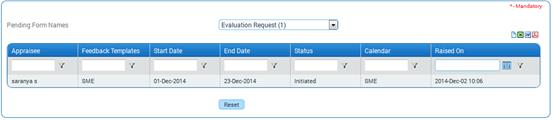
On selecting the form name, the list of requests that are waiting for approval will be shown as below:
Click a record to view details of the request.
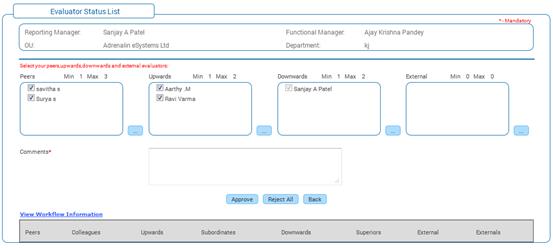
This section displays evaluators selected by the feedback participant, waiting approval. As an approver, the reporting manager can add new evaluators, reject any evaluator, etc.
The selected checkbox indicates that the selected evaluator has been approved upon submission of the form. De-select the checkbox to indicate that the de-selected evaluator will be rejected upon submission of the form.
Click the ellipse button to add Peer/upward/downward evaluators to the Evaluation Request.
Click [Submit]. On submission, all the selected evaluators (selected checkbox) will be approved for the Evaluation Request, and all the un-selected evaluators (de-selected checkbox) will be rejected for the Evaluation Request.
Mail notification will be sent to all the approved evaluators and the initiator.
Clicking [Reject All] will reject the Evaluation Request, as a whole. In this case, the initiator has to initiate the Evaluation Request afresh.
Post Activity
Once approved, the evaluators can provide their feedback using the ‘Competency Feedback’ form.