Leave Compoff Request Approval
Only the approvers who have been configured in the workflow manager will be able to approve the leave encashment requests that are raised by the initiator.
To approve a Comp-off request,
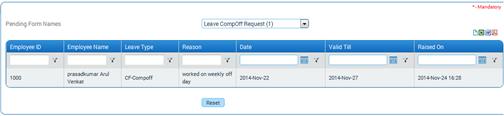
Key-in ‘Forms Pending for Your Approval’ in ZOLOG search bar. Select ‘Leave CompOff Request’ from this list. On selecting the form name, the list of requests that are awaiting approval will be shown as below:
Leave Comp-off request can be approved either by directly selecting the checkbox and clicking [Approve] or by viewing details of comp-off request and then approving. To view details of the comp-off request, click a record.
The leave comp-off request details will be displayed as shown here:
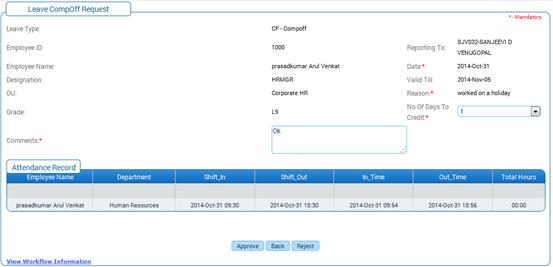
No of Days to Credit dropdown field allows the user to edit the number of days to credit in the approval screen.
Enter Comments and click [Approve] to approve the leave comp-off request.
Click [Reject] to reject the leave encashment request.
Post Activity
Once the Comp-off request is approved, the Comp-off Leave type will be shown in the Leave Request form. The employee can select the Comp-off Leave type and apply for leave.