Manage Quick Launch
To create a Quick Launch item, enter ‘ZOLOG Quick Launch’ in ZOLOG search bar.
Or
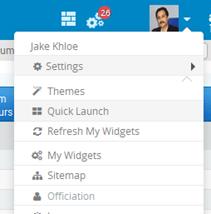
You can invoke the quick launch by clicking ‘Quick Launch’ link in Profile menu.
On selecting the form name, the Quick Launch window pops up as shown below:
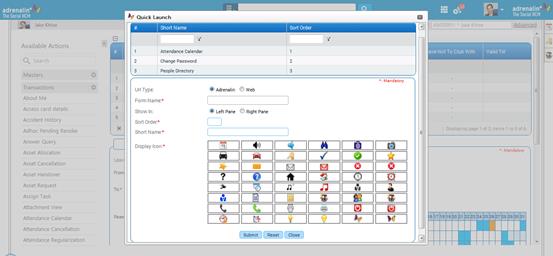
ZOLOG quick launch
Select required URL type, Adrenalin or Web.
o Adrenalin – You can create quick links for any of the frequently used forms in Adrenalin.
o Web – You can create quick links for any web site.
Enter ‘@@’ if you do not to know the form name, else, enter few letters of the form which you want to create a quick link. If the URL type is selected as ‘Web’ then you will have to enter the web site name.
Select whether you want to create the quick links in right pane or left pane.
Specify the order in which the item should get displayed.
Enter a short name for the quick links item
Select any icon to represent the quick link item that you are creating
Click [Submit] to save the details.
Click [Reset] to refresh the form.
Once created, these Quick links appear as ‘sliding window’ on the ZOLOG page, either at the Right side or at the left side based on the selected option.