IT Access Maintenance
Why should I use this form?
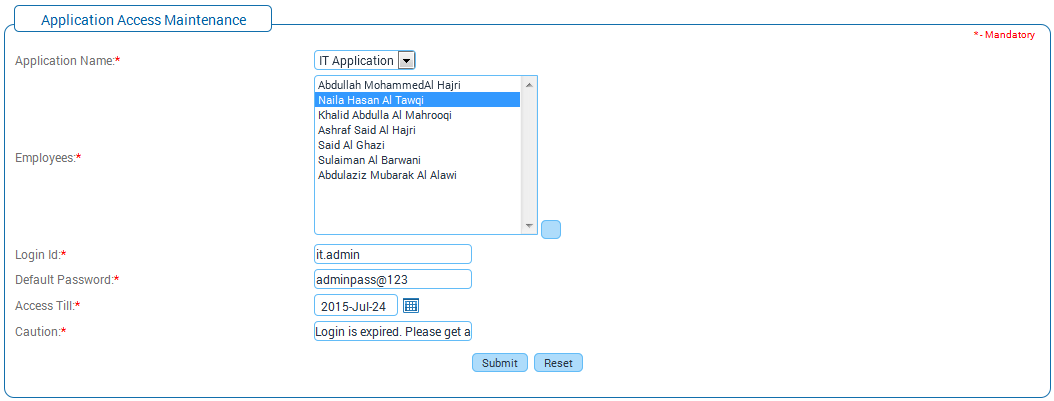
Use this form to give access rights to a particular application, to all / selected employees in the organization. For example, the Attendance application needs to be used by all the employees in the organization. So the Administrator selects the Attendance application and selects all employees to give access rights.
What are the Pre-requisites?
· Application should be available.
· Active employees should be available.
Who can access this form?
This form shall be visible to all employees to whom the visibility is given in Setup HRMS à Module Role Mapping/ Module Administration. Designated employees who would be given visibility are:
· ITFAC
· HRFAC
How to navigate to this form?
Workforce Administration à Application Access Management à IT Access Maintenance.
Field guidelines are as follows:
Field |
Description |
Application Name |
Select the Application from the drop down field, for which access is to be given. This shows the list of all the available applications. |
Employees |
Click the ellipse button to select employees for whom access to be given for the selected application. The Search Expert form is displayed. Search Expert popup window appears allowing to searching for employees.
Select employees by clicking the checkbox and click [Choose]. Selected employees will be shown in ‘Employees’ field. |
Login Id |
Enter Login ID for accessing the selected application. |
Default Password |
Enter the default password, which will be used while logging. |
Access Till |
Select the date till when the selected application can be accessed by the selected employees. |
Caution |
Enter caution message which will be shown to the users, when needed. |
Click [Submit] to save the details.
Clicking [Reset] will refresh the form.