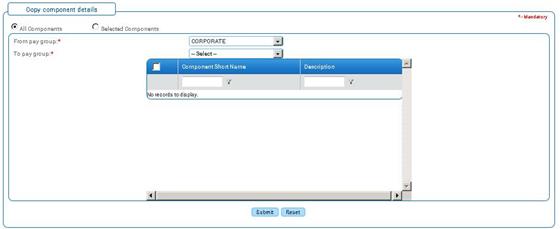
Copy Components
Why should I use this form?
Use this form to copy components from one Pay Group to another Pay Group. This form will create the components from one pay group to another pay group which are not available in pay group to which the component is copied. This will only create if the component does not exist. It will not update any component which is already available.
What are the Pre-requisites?
· Component should be available.
· More than one Pay Group should be available.
Who can access this form?
This form shall be visible to all employees to whom the visibility is given in Setup HRMS ® Module Role Mapping/ Module Administration.
How to navigate to this form?
HR Foundation à Component Setup à Copy Components.
Field Name |
Description |
All components/ Selected components |
Select whether you want to copy all components from a pay group to another or only selected components from the pay group. |
From Pay Group |
Select the Pay Group from which you want to copy components. |
To Pay Group |
Select the Pay Group to which you want to add the copied components. |
· If the option is selected as ‘Selected Components’ when the From and To Pay Groups are selected, list of Components available in the ‘From’ pay groups is shown in the form. This facilitates the user to choose the required components to be copied to the ‘To’ pay group.

Select the components that need to be copied and click [submit].
Click [Reset] to refresh the form.