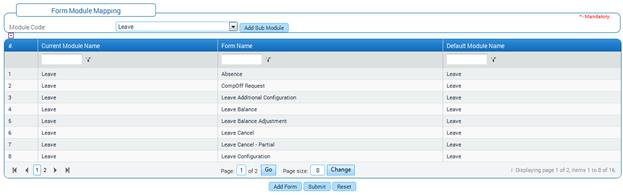
Form Module Mapping
Why should I use this form?
Currently the forms are accessed/managed by the role players mapped for modules using the Module Role Mapping form. There is no provision to see the list of forms that are mapped for a particular module.
It is not possible to give access to some set of forms in a module to a different role player. For example, in case of eRecruitment module, when the module is mapped to RECFAC role player, then all the admin forms and transaction forms are handled by the RECFAC role player. In case there is a need to map the admin forms alone to another role player, currently it is not possible.
The Form Module mapping is introduced to handle this scenario. Here, a new sub module can be created and when the module name is selected, all the forms available under the selected module will be shown. All the admin forms can be mapped to the new sub module. Then using the Module Role Mapping form, the new sub module is mapped to a selected role player.
What are the Pre-requisites?
N/A
Who can access this form?
This form shall be visible to all employees to whom the visibility is given in Setup HRMS à Module Role Mapping/ Module Administration.
How to access this form?
Administration à Setup HRMS à Form Module Mapping.
Add sub module
1. Select the Module Code.
To create a sub module, click [Add Sub module] button. On clicking the button, the Add Sub Module will be shown in a popup window:

Enter Sub module Code and Sub module Name.
Click [Add]. On clicking the [Add] button, the newly created sub module will be listed in Module Code dropdown.

To add forms to the newly created sub module, click [Add Form]. List of all the forms that are avaialble in the application will be available for selection, as shown here:
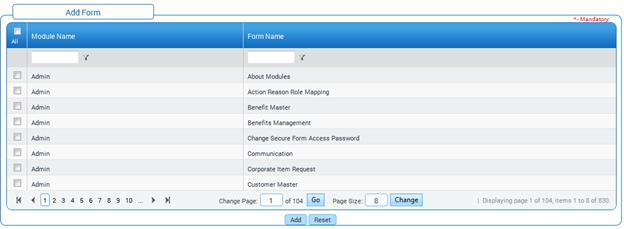
Select the forms which have to be mapped to the new sub module.
Click [Add]. Forms which are added now will be shown as given below:

Click [Submit]
Click [Reset] to refresh the form.
Post Activity
1. When the form is submitted, the new sub module will be reflected in the Module Role Mapping form (Administration à Setup HRMS), which enables providing access rights to specific role player.
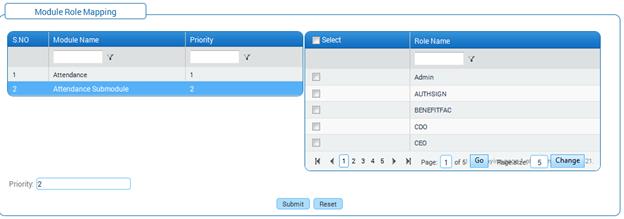
Change mapping of existing forms
The Form Module Mapping form also facilitates changing mapping of forms from one module to another.
To change mapping,
1. Select the Module Code.
2. Click [Add Form] and select forms which you want to map.
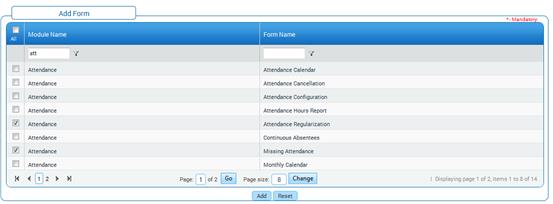
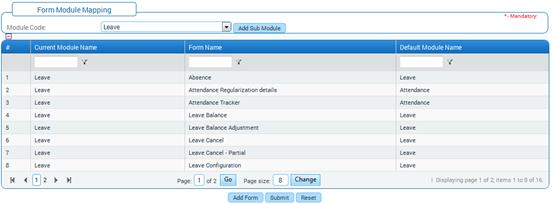
3. Click [Submit] to save the details.
4. Click [Reset] to refresh the form.