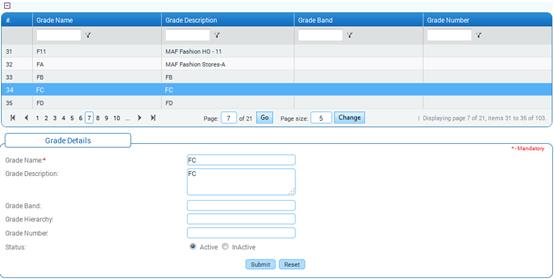
Grade Master
Why should I use this form?
This form facilitates creating and maintaining various Grades in the organization. Each Grade will have a Description and a Grade Band attached to it.
What are the Pre-requisites?
N/A
Who can access this form?
This form shall be visible to all employees to whom the visibility is given in Setup HRMS à Module Role Mapping/ Module Administration.
How to navigate to this form?
HR Foundation à Organization Structure à Grade Master.
Existing grades are shown in the grid. Use the filter section to filter records in the grid based on some condition.
To add new Grade,
1. Enter Grade Name and Grade Description.
2. Enter Grade Band – A set of different grades can be grouped together under one grade band or series.
Click [Submit] to save the Grade.
Click [Reset] to refresh the form.
Post Activity
To Modify any Grade, select the Grade from the grid. Selected Grade will be populated in the form. Make necessary changes and click [Submit] to save the changes.
Note: If the use of a grade is being discontinued then change the status to In-Active.